Top 20 Mobile Photography Tips for 2026: Master Your Smartphone Camera

In 2026, smartphone cameras deliver professional-quality results thanks to advanced AI, high-resolution sensors, periscope zooms, and computational photography. Flagship devices like the iPhone 17 Pro Max, Samsung Galaxy S25 Ultra, Google Pixel 10 Pro, and Xiaomi 15 Ultra make stunning mobile photography accessible to everyone. For even more control and quality, consider stepping up to dedicated hybrid cameras. Whether you’re a beginner or experienced shooter, these practical tips will help you capture sharper, more creative photos and elevate your smartphone shots.
1. Clean Your Camera Lens

Start every shoot with a clean lens. Dust, fingerprints, and smudges reduce sharpness, especially on multi-lens systems. Wipe gently with a microfiber cloth for clear, artifact-free images.
2. Master Your Camera App
Explore your phone’s native camera app fully. Modern apps include AI scene detection, Pro modes for manual controls (ISO, shutter speed, white balance), RAW capture, and advanced options like Night Sight or Astrophotography mode. Features like Portrait Mode with adjustable depth and computational night photography open new creative doors.
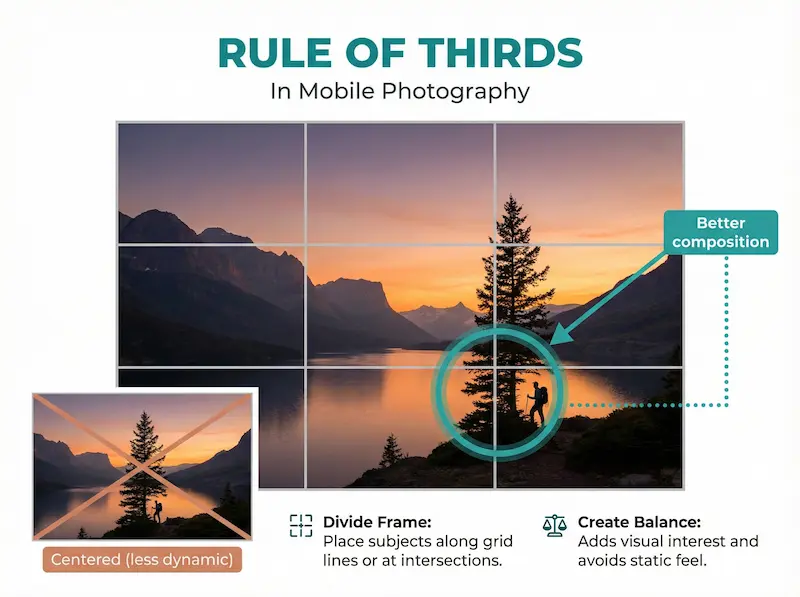
3. Use Gridlines for Better Composition
Enable gridlines to apply the rule of thirds. Align subjects or horizons with lines or intersections for balanced, engaging compositions that guide the viewer’s eye naturally. For more advanced composition techniques, see our guide to capturing stunning camera shots.
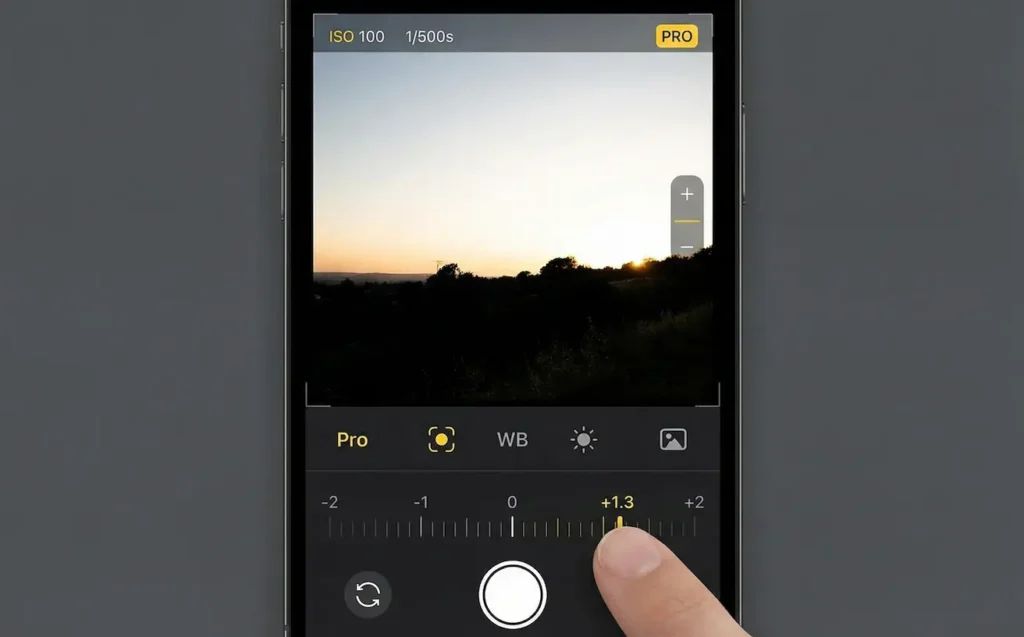
4. Control Focus and Exposure Manually
Tap to focus and adjust exposure on specific areas. In tricky lighting, lock focus/exposure with a long tap. Advanced users can fine-tune in Pro mode for precise results, especially with smartphone’s autofocus systems.
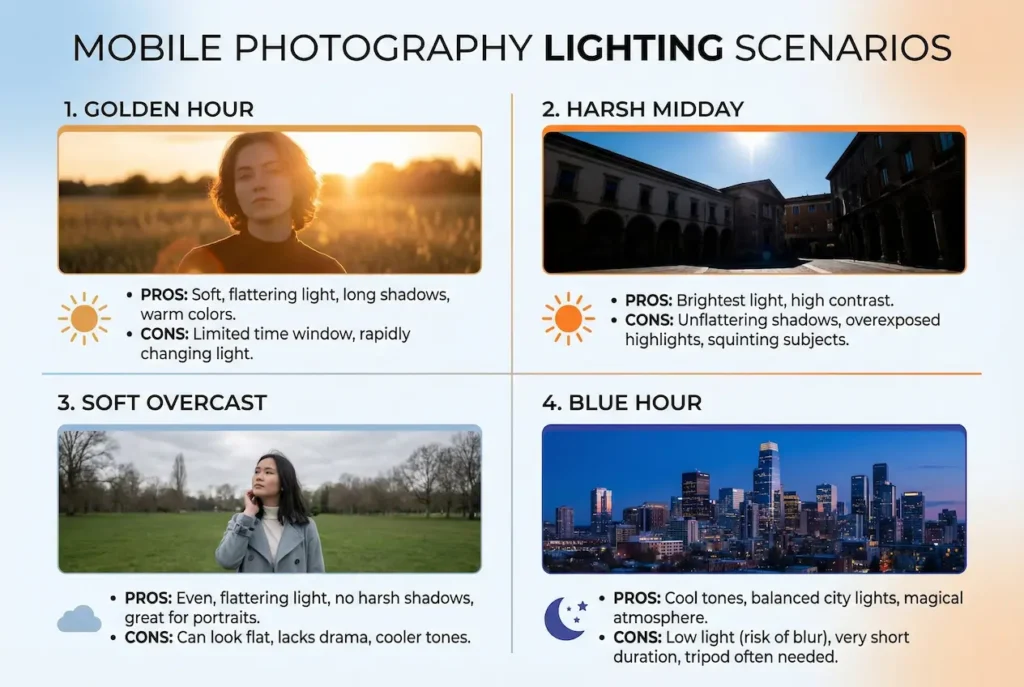
5. Prioritize Natural and Golden Hour Lighting
Natural light remains key. Shoot during golden hour for warm, soft tones. In 2026, AI-enhanced HDR and dynamic range handle mixed lighting better, but avoid harsh midday sun for flattering results.
6. Stabilize for Sharp Shots
Hold steady with both hands or use a tripod/gimbal. Many phones now feature advanced optical and sensor-shift stabilization—great for low-light or long exposures without blur.
7. Experiment with Angles and Perspectives
Shoot from low, high, or unique angles. Use ultra-wide lenses for dramatic views or telephoto for compressed perspectives and distant subjects.

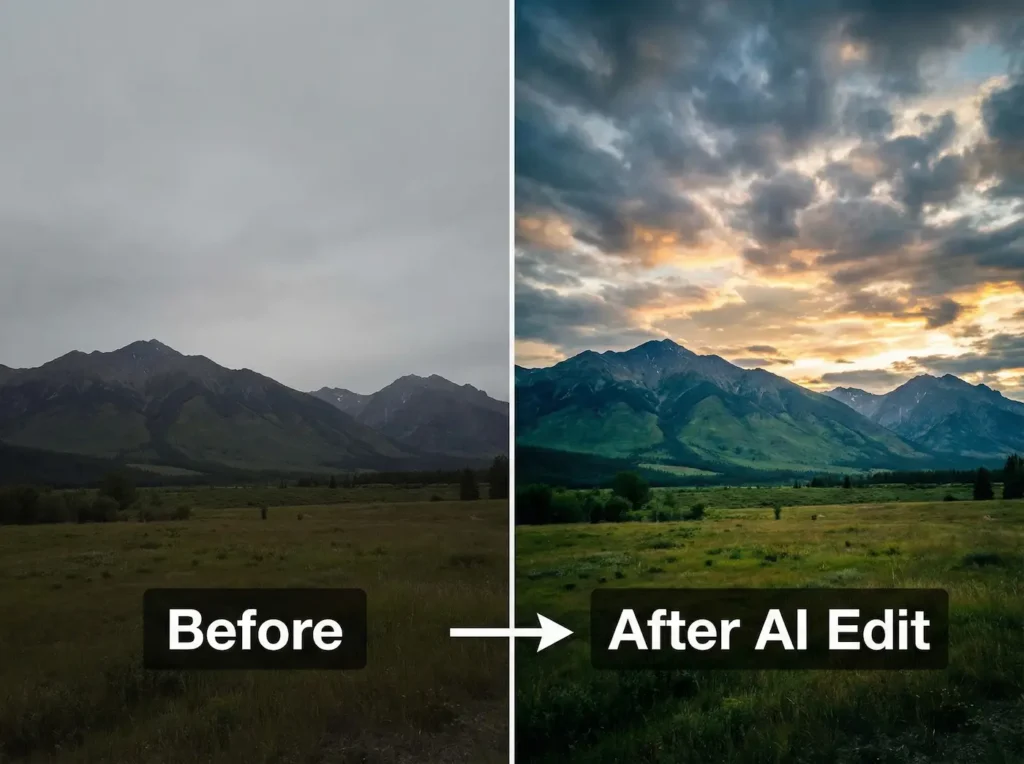
8. Edit with Powerful Apps and AI Tools
Edit with apps like Adobe Lightroom, Snapseed, or built-in AI editors. Remove objects, enhance skies, or apply generative fills. Tools like Magic Editor on Pixel or Apple Intelligence features streamline pro-level edits.
9. Practice Regularly
Practice consistently to improve. Shoot daily, try new features like macro mode or long-exposure simulations, and review your results to refine techniques.
10. Focus on Storytelling
Capture emotion and narrative. Mobile photography excels at candid, everyday moments—use it to tell personal stories that connect deeply, similar to techniques in wedding photography.
11. Explore Different Perspectives
Go beyond eye level. Low angles add drama; overhead shots suit food or flat lays. Periscope zooms bring distant details closer without quality loss. For pocket-friendly upgrades beyond smartphones, try the Fujifilm XQ2 compact camera.
12. Create Depth with Portrait Mode
Use advanced Portrait modes for shallow depth-of-field. Adjustable lighting effects and AI subject separation produce studio-like bokeh on flagships.
13. Capture Action with Burst and AI Modes
Burst mode freezes fast action. AI features like Action Mode or Best Take select perfect frames from sequences automatically.
14. Use HDR and AI for Challenging Scenes
Enable HDR or auto AI modes for high-contrast situations. These merge exposures and enhance details in shadows/highlights intelligently.
15. Create Dramatic Silhouettes
Backlight subjects against bright sources like sunsets. Expose for the background and let AI refine edges for striking contrasts.
16. Incorporate Negative Space
Use empty areas to emphasize subjects. Minimalist compositions with negative space feel modern and impactful.
17. Follow Leading Lines
Guide the eye with roads, architecture, or natural lines toward your focal point for dynamic flow.
18. Capture Reflections Creatively
Use water, glass, or mirrors for symmetrical or abstract shots. Ultra-wide lenses add immersive reflection effects.
19. Shoot Candid Moments
Keep your camera ready for authentic expressions. Quick-launch features and silent modes help capture genuine emotions discreetly. Many creators use these for vlogging too—check top vlogging cameras.
20. Try Long Exposure and Creative Effects
Use built-in long-exposure modes or apps for light trails, silky water, or motion blur. Some phones offer native astrophotography for starry skies.
Conclusion
Smartphone cameras in 2026 rival dedicated gear with AI smarts, versatile lenses, and powerful editing. Apply these tips to transform everyday moments into stunning images. Experiment freely, stay inspired, and enjoy the creative freedom your phone provides—one shot at a time.

Frequently Asked Questions
Do I need a professional camera for great photos?
No—2026 smartphones deliver exceptional results with AI and advanced sensors. Master composition, lighting, and editing for pro-quality shots affordably.
How can I improve low-light photography?
Use Night modes with AI noise reduction and longer exposures. Stabilize your phone and let computational photography handle details.
What’s the best editing app for mobile photos?
Lightroom for pro controls, built-in AI editors for quick enhancements, or Snapseed for precise adjustments.
How do I get better zoom quality?
Use optical/telephoto lenses when available. AI-enhanced digital zoom on top phones maintains detail at higher magnifications.
Any tips for video alongside photos?
Many tips apply to video—stabilize, use good light, and leverage cinematic modes or ProRes/Log for advanced recording.